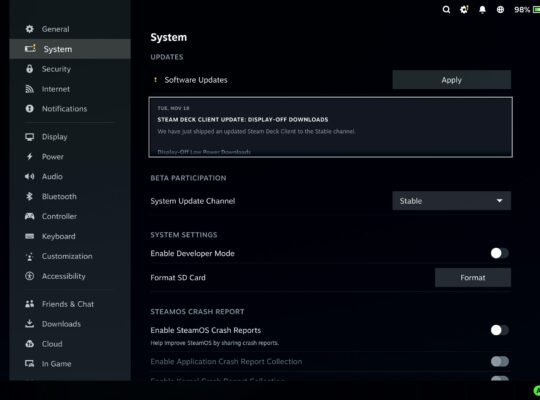
Valve pushed out a fresh Steam Deck Client update to the Stable channel, and it quietly solves more problems than most people realise. They also re-released the patch on November 18th to deal with an annoying issue where the client would reload right after entering payment details. Typical weird Steam behaviour finally put to bed.
Full update notes are here: https://steamcommunity.com/app/1675200/eventcomments/680734305649011599
The headline feature this time is Display Off low power downloads. When your Deck finishes a session and decides it wants a nap, it can now keep downloading everything in the background with the screen switched off. If your Deck is plugged in, it’s on by default. If you want it on battery, flick it on in Settings then Power.
Display Off low power downloads
This is a genuinely useful addition. Active downloads can continue in a low power mode before the Deck goes to sleep. The whole point is simple: less wasted time waiting for updates and installs when you boot your Deck again.
General fixes
Plenty of nagging issues got cleaned up:
• Collections going missing after reinstalling Steam
• Parental-blocked titles throwing launch dialogs
• Alerts refusing to show on Steam web pages
• Network icon being in a mood during startup
• Quick Access Menu alignment behaving itself in game
• Hidden games now sitting in their own tab rather than showing up everywhere
• Controls locking up for a few seconds after resume or reconnect
• Incorrect Steam Play settings applied when installing a game straight after purchase
• Bluetooth devices refusing to appear when toggling BT
• SteamOS updates now respecting HTTP proxy settings
Accessibility
A small but welcome improvement to high contrast support in settings.
Friends and Chat
The chat system finally grows up a bit. You can report suspicious or harassing messages directly from the chat window. There’s also a warning banner for chats that look potentially malicious, and any links in those messages are blocked until you dismiss the warning.
Steam Input
Controllers get several stability improvements:
• Gyro sensitivity issues fixed
• PS5 gyro over BT fixed, Nintendo gyro made more stable
• Mode shift bindings no longer break when swapping left and right hand sources
• Guide button no longer launches overlay when disabled
• Latest GameInput supported
• PlayStation light bar settings now stick properly
• Added support for the 8BitDo 64 Bluetooth Controller
Remote Play
Streaming remote desktop now has a clear Connect button. Big Picture Mode stays out of the way when streaming to the Deck.
Remote Play Together
Player input toggling now works correctly and saves per game. Mouse cursor sharing is improved, with the local player getting priority.
Game Recording
Timeline markers should now appear consistently when viewing recordings outside of games.
Desktop Mode
Windows for the client and chat will finally remember where you put them.